Veldenhove: The Functions That Shape Your Information
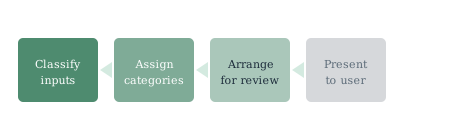
Veldenhove performs four core functions: classifying information, preparing it for review, presenting it through a structured interface, and handling user enquiries. Each is explained below.
Core functions
What Veldenhove does for users
Each function addresses a distinct aspect of how information is handled — from initial classification through to the user's review interface.
Function 01
Information Classification
Veldenhove's primary function is to assign incoming information to categories. Classification uses the service's organising logic to label each item by subject, type, and relevance. The result is a sorted, labelled set of records that can be reviewed without manual sorting by the user.
Function 02
Structured Review
Once classified, information is arranged into review-ready formats. These include grouped records, hierarchical summaries, and filtered views. The aim is to reduce the effort required to locate and assess relevant information within a larger organised set.
Function 03
Guided Navigation
The system's interface provides navigation tools that help users move through organised information. Filters, category selectors, and search-by-label features support efficient review of both broad information sets and specific, narrowly defined topics.
Function 04
Enquiry Handling
Users interact with the system by submitting enquiries. The service processes each enquiry, applies the appropriate classification filters, and returns a structured result. The enquiry interface is accessible through the Reach Us page.
Veldenhove does not invent categories or apply labels speculatively. Classification is applied according to defined rules, and users can inspect how results are labelled before they begin their review.
Access process
How to begin using the service
Accessing Veldenhove involves three steps. Each is straightforward, and the support team is available if clarification is needed at any stage.
Submit a request through the contact form
Use the contact form on the Reach Us page to submit an access request. Include a description of the information you intend to review and your preferred format for receiving organised results. The more specific your request, the better the team can advise on what the service can provide.
Receive a review and any follow-up questions
The Veldenhove team reviews each request and confirms whether access can be arranged. If clarification is needed, a team member will make contact using the email address you provided. Access is not automatically granted on submission.
Receive your organised information view
Once access is confirmed, you will receive a structured view of the relevant information. This view is organised according to the system's classification categories and the specifics of your submitted request. Navigation tools will be available to support your review.